The iPad 3 will reportedly use a thinner, lighter, and 20-30% more expensive battery than the iPad 2, according to CENS. The battery will be supplied by Simplo Technology Co. and Dynapack International Technology Corp. Institutional investors pointed out that the battery pack for iPad 3, scheduled to be massively produced in the first quarter of next year, has been redesigned to be thinner and lighter with a longer service life than iPad 2 edition's. Furthermore, the new battery pack will also be required to meet CTIA IEEE 1625 standard for better quality and safety reliability, a trend that has been commonly seen nowadays, especially in the U.S. For example, consumer electronic devices with coming ordinary battery packs are banned by AT&T, the country's largest service provider, from sales on its product shelf as well as from its mobile network services, until with IEEE1625-certificated battery packs. The battery packs are scheduled to begin delivery starting in the fourth quarter.
Rowmote Pro is the ultimate wireless remote, trackpad, and keyboard. A gorgeous universal app for iPhone, iPod Touch, and iPad, with everything from a multitouch trackpad to full extended keyboard support, and with no-configuration control of dozens of the best Mac applications, it is a must-have for any home media center or presentation! Please read the full description and requirements below :)
You love the remote control which came with your Mac - so simple yet elegant, with easy control of Front Row, iTunes, Quicktime, DVD Player, Keynote, and more.
Or, your Mac didn’t come with a remote control or doesn’t even have an infrared port. The Apple Remote or a 3rd party infrared receiver would cost a significant amount. Add ANOTHER hit to your wallet for a wireless control like a keyboard, mouse, or the Apple Magic Trackpad!
You carry your iPhone, iPod Touch, or iPad wherever you go... so why should you carry a second device just to control your computer? Furthermore, why should you need line-of-sight to do so?
Enter Rowmote Pro! Rowmote Pro is like your Mac or Apple TV’s remote control, but over the wireless network and even better! Trackpad and keyboard give you complete control over your computer, and you can control, launch, and quit apps, toggle the iTunes Visualizer, and more without ever having to squint at your screen. Rowmote is Mac-like from the ground up.
FEATURES
- Control your Mac or Apple TV completely over a wireless network. No line of sight necessary.
- Works like the hardware Apple Remote Control in:
• Front Row
• Adobe Lightroom 2
• Airfoil Video
• Amarra
• Apple TV (after software installation)
• Boxee
• DVD Player
• eyeTV 3.x
• Firefox
• Hulu Desktop
• iPhoto
• iTunes
• Keynote ‘08 & ‘09
• kJams Pro
• Last.fm
• Logic
• Microsoft Powerpoint 2004 and later
• mPlayer
• Movist
• OpenOffice Impress
• Quicktime
• PandoraBoy
• PandoraJam
• Plex
• Safari
• Skim
• Songbird
• Spotify
• The Tube
• VLC
• xbmc
- Click-and-hold works just like on the physical remote in applications
PRO CONTROL: A single tap switches to the keyboard & trackpad mode.
- Portrait & landscape mode
- True multitouch: Scroll with two fingers, right click, drag, pinch to zoom, and swipe with 3 or 4 fingers
- Tap anywhere or use the virtual button
- Type on your computer, including extended characters, modifier keys, and function keys
- iPad only: Function keys keyboard includes a numeric pad
- Multiple monitor support
- SWITCH: Access your Mac’s Dock, launching & switch between all controllable applications on the Mac, toggle the iTunes visualizer, and more.
- Sleep & wake as needed (wireless waking requires Mac OS X 10.6).
- iPad exclusive: Innovative Gesture Pad for no-look control over all the above applications; the Gesture Pad doubles as a trackpad, too.
- Secure authentication
- Connect via Bluetooth if your carrier supports Internet Tethering (iPhone / iPod Touch)
REQUIREMENTS
• Mac OS X 10.4.0 or later or an Apple TV.
• Mac: The free Rowmote Helper program must be running on the Mac to be controlled. Download at www.rowmote.com. Some features require Mac OS X 10.5.0 or later.
• Apple TV: Apple TV installation requires following the multistep instructions found at www.rowmote.com. Please review these instructions, which include installing free third party software on your Apple TV, before purchasing!
• The portable device must be on the same wireless network (or a computer-to-computer network). If a firewall is enabled, Rowmote Helper must be allowed access (port 5842).
Rowmote Pro is the only app you need to control your computer. Couple it with Apple’s free Remote app to turn your iPhone or iPod Touch into the ultimate controller for home stereo, mobile presentation, or casual video viewing.
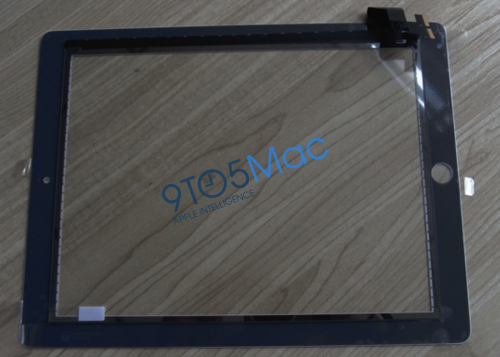
Photos of what appears to be white bezel for the iPad 2 have been leaked online by 9to5Mac and iFixYouri. The piece that we have (from Shenzhen City), thanks to the folks at the iFixYouri iPhone repair shop, is the "digitizer" sometimes known as the the thick bezel.
If you look closely at the back of the part, below, you will see the camera hole, which happens to fit perfectly with the iPad 2 screen protectors from our friends in Asia. This is in addition to the ambient light sensor found on the top of the first-generation iPad. We don't know whether or not the new iPad will also come in a black finish but, we'll surely know all come March 2nd. Apple is holding a specialeventon March 2nd at the Yerba Buena Center for the Arts at 10:00 am where they will likely reveal the iPad 2.